I2P 项目为 Debian、Ubuntu 及其衍生发行版维护官方软件包。本指南提供了使用我们官方仓库安装 I2P 的全面说明。
🚀 Beta: Automatic Installation (Experimental)
For advanced users who want a quick automated installation:
This one-liner will automatically detect your distribution and install I2P. Use with caution - review the installation script before running.
curl -fsSL https://i2p.net/installlinux.sh | sudo bash
What this does:
- Detects your Linux distribution (Ubuntu/Debian)
- Adds the appropriate I2P repository
- Installs GPG keys and required packages
- Installs I2P automatically
⚠️ This is a beta feature. If you prefer manual installation or want to understand each step, use the manual installation methods below.
Ubuntu 安装
Ubuntu 及其官方衍生版本(Linux Mint、elementary OS、Trisquel 等)可以使用 I2P PPA(Personal Package Archive,个人软件包归档)进行简便安装和自动更新。
- 打开 I2P Router Console
- 导航到 Network Configuration page
- 记录列出的端口号(通常是 9000-31000 之间的随机端口)
- 在您的路由器/防火墙中转发这些 UDP 和 TCP 端口
这是在基于 Ubuntu 的系统上安装 I2P 最快且最可靠的方法。
步骤 1:添加 I2P PPA
Debian Installation
打开终端并运行:
- 访问配置页面
- 找到带宽设置部分
- 默认值为 96 KB/s 下载 / 40 KB/s 上传
- 如果您的网络速度更快,请提高这些数值(例如,对于典型的宽带连接,可设置为 250 KB/s 下载 / 100 KB/s 上传)
此命令将 I2P PPA 添加到 /etc/apt/sources.list.d/ 并自动导入用于签名软件仓库的 GPG 密钥。GPG 签名可确保软件包自构建以来未被篡改。
Post-Installation Configuration
步骤 2:更新软件包列表
Method 1: Command Line Installation (Recommended)
刷新系统的软件包数据库以包含新的 PPA:
这将从所有已启用的软件源(包括您刚刚添加的 I2P PPA)检索最新的软件包信息。
步骤 3:安装 I2P
sudo apt-add-repository ppa:i2p-maintainers/i2p
现在安装 I2P:
就这样!跳转到安装后配置 部分,了解如何启动和配置 I2P。
如果您更喜欢图形界面,可以使用 Ubuntu 的软件中心添加 PPA。
sudo apt-get update
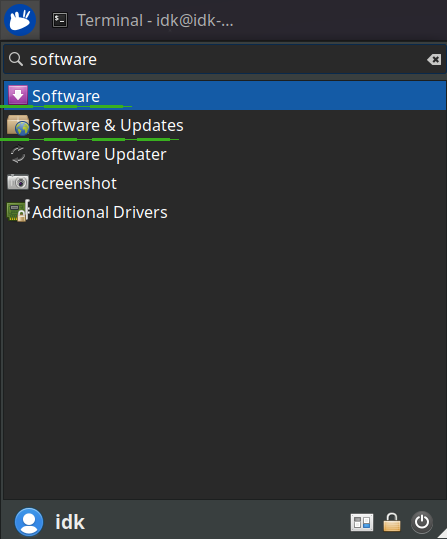
步骤 1:打开软件和更新
从应用程序菜单中启动"软件和更新"。
sudo apt-get install i2p
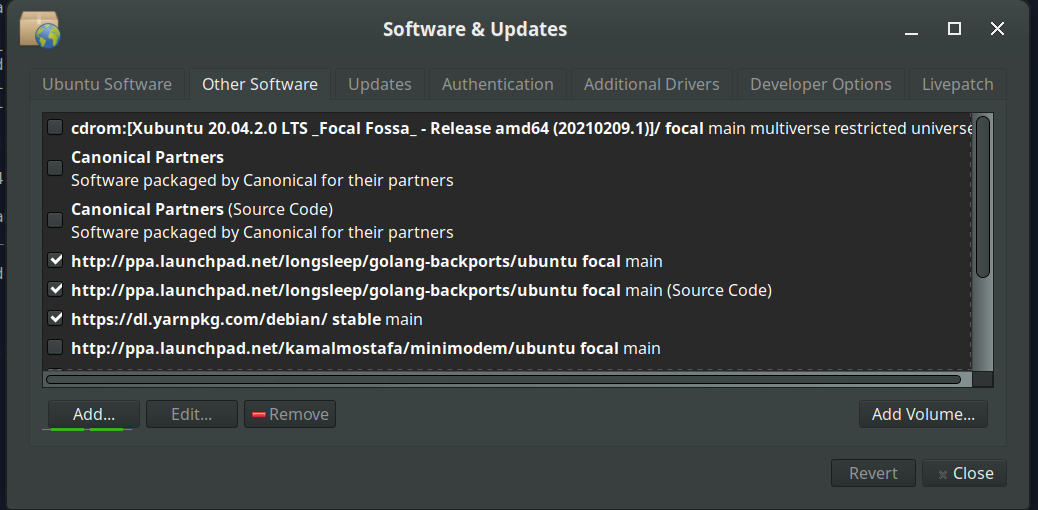
步骤 2:导航到其他软件
Method 2: Using the Software Center GUI
选择"其他软件"选项卡,然后点击底部的"添加"按钮来配置新的 PPA。
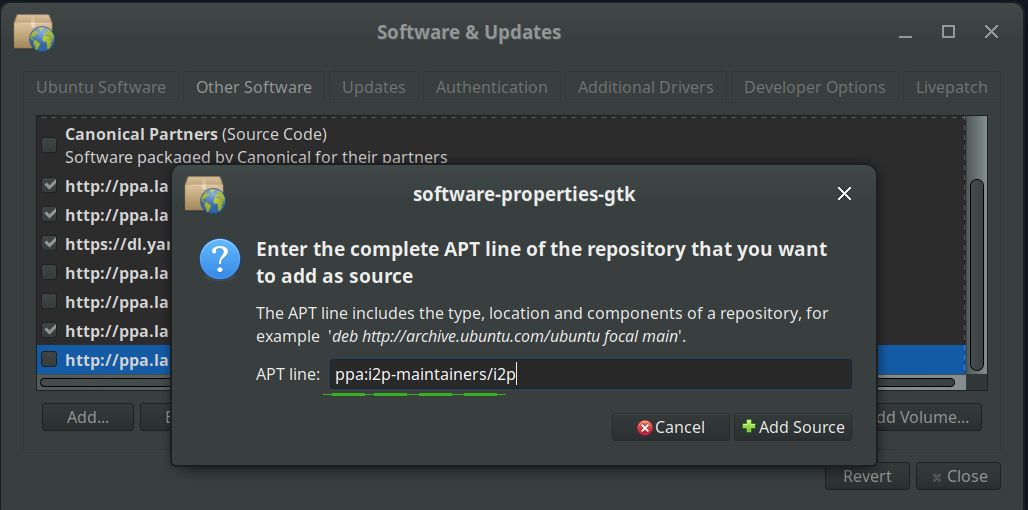
步骤 3:添加 I2P PPA
在 PPA 对话框中,输入:
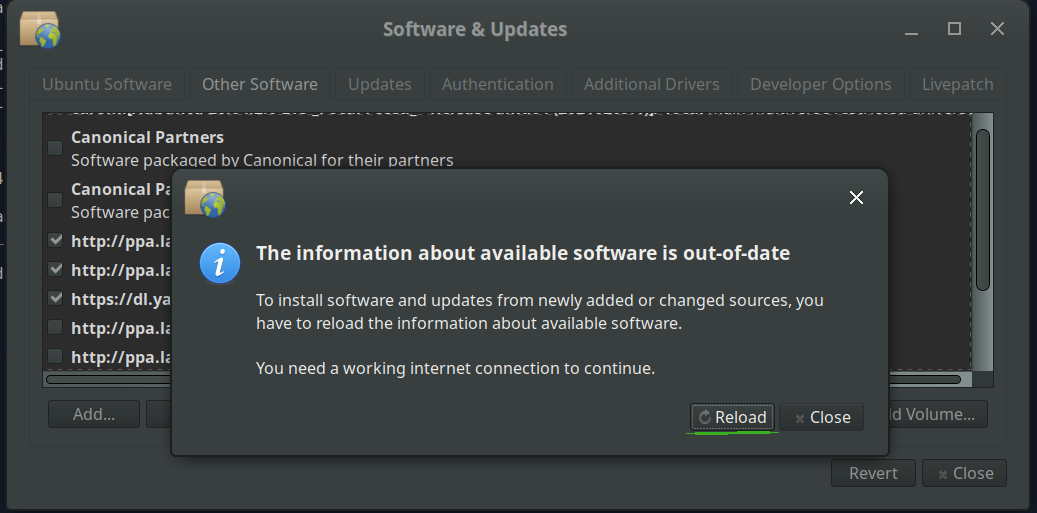
步骤 4:重新加载仓库信息
点击"重新加载"按钮以下载更新的仓库信息。
步骤 5:安装 I2P
ppa:i2p-maintainers/i2p
从应用程序菜单中打开"软件"应用程序,搜索"i2p",然后点击安装。
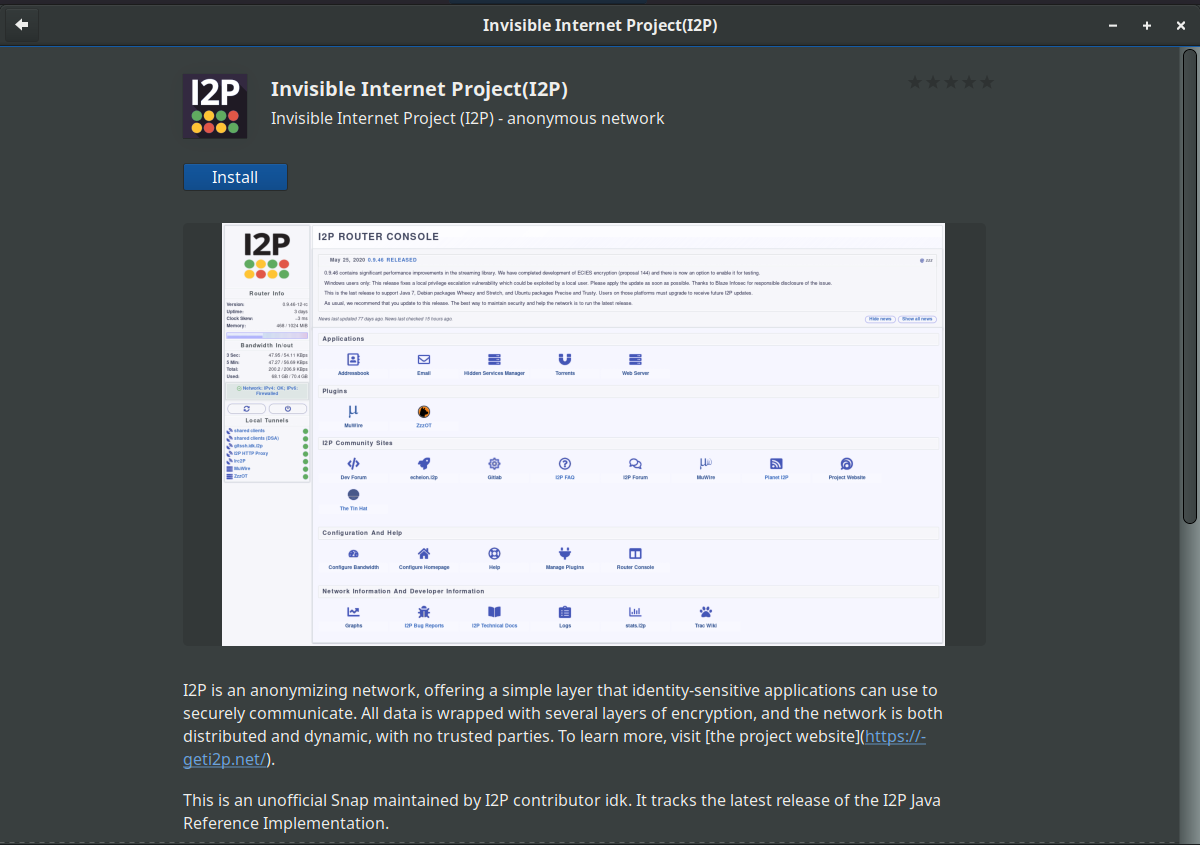
安装完成后,请继续进行安装后配置 。
Debian 及其下游发行版(LMDE、Kali Linux、ParrotOS、Knoppix 等)应使用位于 deb.i2p.net 的官方 I2P Debian 软件源。
我们在 deb.i2p2.de 和 deb.i2p2.no 的旧仓库已停止维护。 如果您正在使用这些旧版仓库,请按照以下说明迁移到位于 deb.i2p.net 的新仓库。
以下所有步骤都需要 root 权限。可以使用 su 切换到 root 用户,或在每条命令前加上 sudo。
步骤 1:安装所需软件包
确保您已安装必要的工具:
Debian 安装
这些软件包提供安全的 HTTPS 仓库访问、发行版检测和文件下载功能。
Important Notice
步骤 2:添加 I2P 仓库
Prerequisites
您使用的命令取决于您的 Debian 版本。首先,确定您正在运行的版本:
方法 1:命令行安装(推荐)
将此与 Debian 发行版信息 交叉参照,以确定您的发行版代号(例如 Bookworm、Bullseye、Buster)。
对于 Debian Bullseye (11) 或更新版本:
sudo apt-get update
sudo apt-get install apt-transport-https lsb-release curl
对于基于 Debian Bullseye 或更新版本的衍生发行版(LMDE、Kali、ParrotOS 等):
对于 Debian Buster (10) 或更早版本:
对于基于 Debian 的系统(Buster 或更早版本):
cat /etc/debian_version
步骤 3:下载仓库签名密钥
步骤 4:验证密钥指纹
echo "deb [signed-by=/usr/share/keyrings/i2p-archive-keyring.gpg] https://deb.i2p.net/ $(lsb_release -sc) main" \
  | sudo tee /etc/apt/sources.list.d/i2p.list
在信任该密钥之前,请验证其指纹是否与官方 I2P 签名密钥匹配:
echo "deb [signed-by=/usr/share/keyrings/i2p-archive-keyring.gpg] https://deb.i2p.net/ $(dpkg --status tzdata | grep Provides | cut -f2 -d'-') main" \
  | sudo tee /etc/apt/sources.list.d/i2p.list
验证输出显示此指纹:
echo "deb https://deb.i2p.net/ $(lsb_release -sc) main" \
  | sudo tee /etc/apt/sources.list.d/i2p.list
⚠️ 如果指纹不匹配,请勿继续操作。 这可能表明下载文件已被篡改。
echo "deb https://deb.i2p.net/ $(dpkg --status tzdata | grep Provides | cut -f2 -d'-') main" \
  | sudo tee /etc/apt/sources.list.d/i2p.list
步骤 5:安装仓库密钥
curl -o i2p-archive-keyring.gpg https://i2p.net/_static/i2p-archive-keyring.gpg
将已验证的密钥环复制到系统密钥环目录:
仅适用于 Debian Buster 或更早版本,您还需要创建一个符号链接:
gpg --keyid-format long --import --import-options show-only --with-fingerprint i2p-archive-keyring.gpg
步骤 6:更新软件包列表
7840 E761 0F28 B904 7535 49D7 67EC E560 5BCF 1346
刷新系统的软件包数据库以包含 I2P 软件源:
步骤 7:安装 I2P
同时安装 I2P router 和密钥环软件包(以确保您能够接收未来的密钥更新):
sudo cp i2p-archive-keyring.gpg /usr/share/keyrings
太好了!I2P 现在已经安装完成。继续进行安装后配置 部分。
sudo ln -sf /usr/share/keyrings/i2p-archive-keyring.gpg /etc/apt/trusted.gpg.d/i2p-archive-keyring.gpg
安装 I2P 后,您需要启动 router 并进行一些初始配置。
sudo apt-get update
I2P 软件包提供三种方式来运行 I2P router:
需要时使用 i2prouter 脚本手动启动 I2P:
sudo apt-get install i2p i2p-keyring
重要提示:不要使用 sudo 或以 root 身份运行!I2P 应该以普通用户身份运行。
停止 I2P:
Next Steps
如果您使用的是非 x86 系统或 Java Service Wrapper 在您的平台上无法运行,请使用:
方法 2:使用软件中心图形界面
再次强调,不要使用 sudo 或以 root 身份运行。
Option 1: On-Demand (Basic)
为获得最佳体验,请配置 I2P 在系统启动时自动运行,甚至在登录之前:
i2prouter start
这将打开一个配置对话框。选择"是"以启用 I2P 作为系统服务。
这是推荐的方法,因为:- I2P 在启动时自动启动 - 你的 router 保持更好的网络集成 - 你为网络稳定性做出贡献 - I2P 在你需要时立即可用
i2prouter stop
Option 2: On-Demand (Without Java Service Wrapper)
首次启动 I2P 后,需要几分钟时间才能融入网络。在此期间,请配置以下基本设置:
i2prouter-nowrapper
为了获得最佳性能和网络参与度,请通过您的 NAT/防火墙转发 I2P 端口:
Option 3: System Service (Recommended)
如果您需要端口转发方面的帮助,portforward.com 提供了针对特定路由器的指南。
sudo dpkg-reconfigure i2p
默认带宽设置较为保守。请根据你的互联网连接调整这些设置:
注意:设置更高的限制有助于网络并提高您自己的性能。
Initial Router Configuration
要访问 I2P 站点 (eepsite) 和服务,请配置您的浏览器使用 I2P 的 HTTP 代理:
1. Configure NAT/Firewall
请参阅我们的浏览器配置指南 ,了解 Firefox、Chrome 和其他浏览器的详细设置说明。
- 确保您没有以 root 身份运行 I2P:
ps aux | grep i2p - 检查日志:
tail -f ~/.i2p/wrapper.log - 验证 Java 是否已安装:
java -version
2. Adjust Bandwidth Settings
如果在安装过程中收到 GPG 密钥错误:
- 重新下载并验证密钥指纹(上述步骤 3-4)
- 确保 keyring 文件具有正确的权限:
sudo chmod 644 /usr/share/keyrings/i2p-archive-keyring.gpg
如果 I2P 没有接收到更新:
3. Configure Your Browser
如果你正在使用旧的 deb.i2p2.de 或 deb.i2p2.no 软件源:
现在 I2P 已安装并运行:
故障排除
重要通知
- 验证仓库已配置:
cat /etc/apt/sources.list.d/i2p.list - 更新软件包列表:
sudo apt-get update - 检查 I2P 更新:
sudo apt-get upgrade
前置要求
欢迎来到隐形网络!
- 删除旧的软件源:
sudo rm /etc/apt/sources.list.d/i2p.list - 按照上面的 Debian 安装 步骤操作
- 更新:
sudo apt-get update && sudo apt-get install i2p i2p-keyring
安装步骤
如果 I2P 未收到更新:
- 配置你的浏览器 以访问 I2P 站点
- 探索 I2P router console 来监控你的 router
- 了解你可以使用的 I2P 应用程序
- 阅读 I2P 的工作原理 以理解网络运作机制
Migrating from old repositories
如果您正在使用旧的 deb.i2p2.de 或 deb.i2p2.no 软件源:
- 移除旧的仓库:
sudo rm /etc/apt/sources.list.d/i2p.list - 按照上方的Debian 安装 步骤操作
- 更新:
sudo apt-get update && sudo apt-get install i2p i2p-keyring
下一步
现在 I2P 已安装并正在运行:
欢迎来到隐形互联网!